
Download SiteCrawler – Fast Mac Web‑Site Capture Tool
Overview
SiteCrawler is a lightweight, trial‑version utility designed exclusively for macOS users who need to capture entire websites for offline browsing, archiving, or research. First added to our catalog in 2007, the program has accumulated more than 5,500 downloads, reflecting a steady interest from developers, designers, and digital archivists. Though its last update (v 1.1.2) dates back to April 19 2007, the software remains functional on Mac OS X and earlier versions, offering a simple, no‑frills interface that prioritizes speed and low disk usage.
Available in English and Swedish, SiteCrawler falls under the Internet software category with a sub‑category of Download Managers, positioning it alongside other tools that automate file retrieval from the web. Its primary strength lies in the ability to mirror an entire site—including HTML pages, images, CSS, and JavaScript—while preserving the original directory structure, making offline navigation seamless. Because it is a trial version, users can test core functionality without a purchase, but a full license is required for unlimited crawling and advanced options such as password‑protected site handling or multi‑threaded downloading.
For anyone seeking a secure, free‑to‑try solution that respects system resources, SiteCrawler offers a compelling balance of features and performance on macOS platforms.
Compatibility: macOS (Mac OS X) and prior versions.
Key Features of SiteCrawler
- Complete website mirroring – captures HTML, images, CSS, JavaScript, and media files.
- Low disk‑space footprint – the installer requires less than 5 MB, and the crawler stores only the files it downloads.
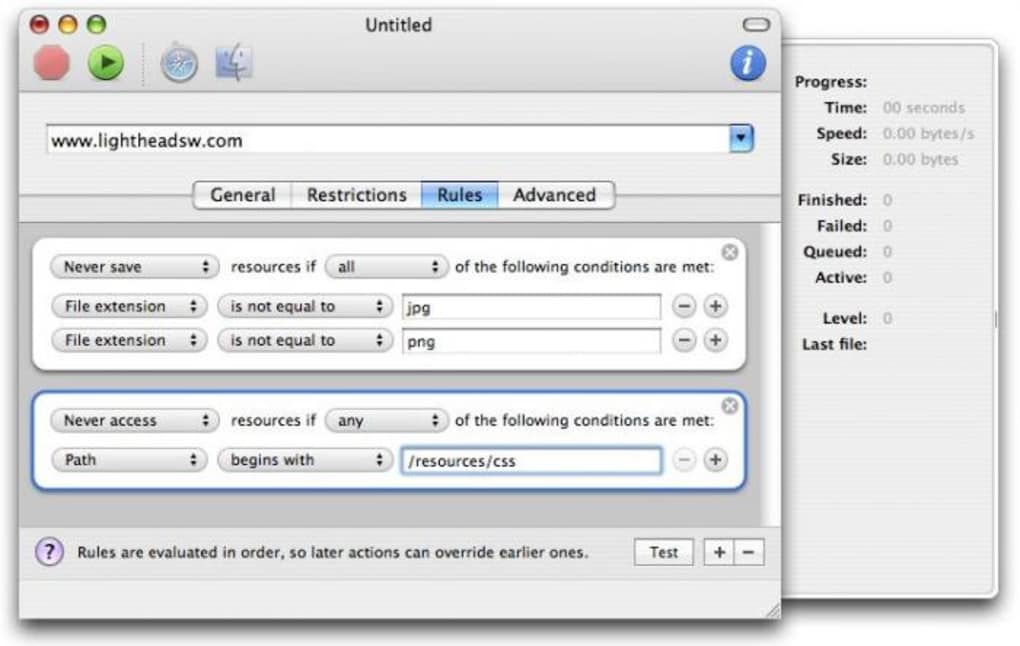
- Selective crawling – users can set depth limits, exclude file types, or define URL patterns to avoid.
- Preserves original directory structure – offline browsing mirrors the live site’s navigation.
- Multi‑language support – available in English and Swedish, with UI strings easy to translate.
- Speed‑optimized engine – uses a single‑threaded download approach to stay gentle on server load while maintaining reasonable crawl rates.
- Trial mode – free to test core features, with a simple upgrade path for the full version.
- Secure download – all files are fetched over HTTP/HTTPS with built‑in certificate verification.
While SiteCrawler does not include the modern multi‑threaded capabilities found in newer download managers, its streamlined design makes it ideal for users who prefer a straightforward tool without the bloat of extra plugins or cloud integrations. The ability to set depth limits is particularly useful for researchers who only need a specific section of a large site, reducing unnecessary bandwidth consumption. Additionally, the software’s modest system requirements mean it can run comfortably on older Mac hardware, extending its usefulness to users with legacy machines.
Installation & Usage Guide
Installing SiteCrawler on macOS is a simple three‑step process. First, download the trial installer from the official website or a trusted software repository. The file is typically named SiteCrawler_1.1.2.dmg. Once the download completes, double‑click the DMG to mount the disk image, then drag the SiteCrawler.app icon into your /Applications folder. macOS may prompt you to confirm that you trust the developer; click “Open” to proceed.
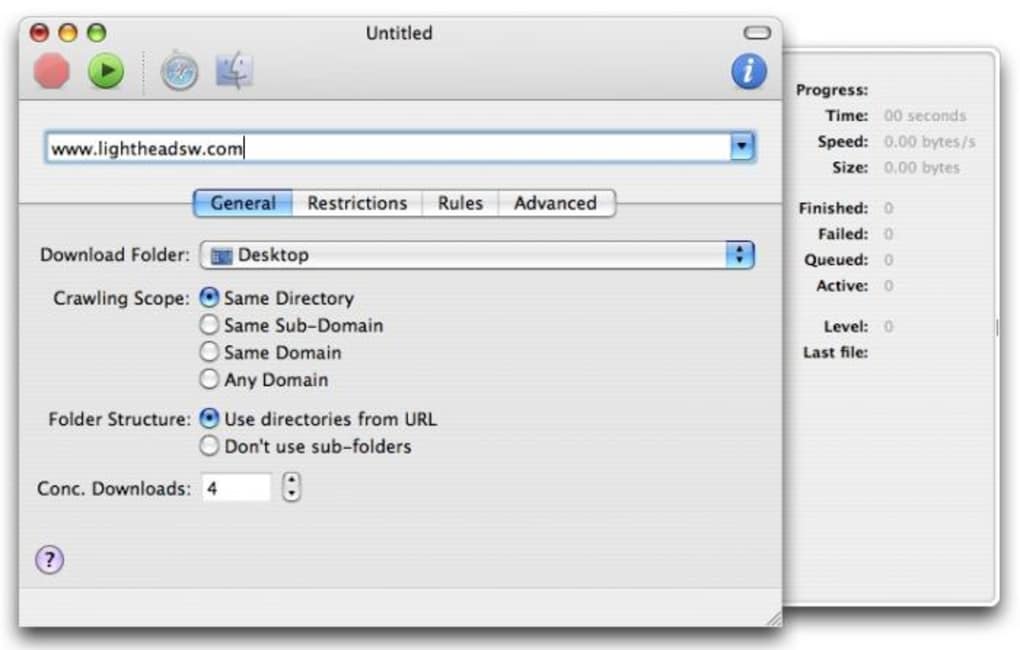
After installation, launch SiteCrawler from the Applications folder. The main window presents a clean interface with three primary fields: the URL of the site you wish to capture, the destination folder on your local drive, and optional settings such as “Maximum depth” and “File type filter.” Enter the target website address, choose a local folder (or accept the default), and click the “Start Crawl” button to begin. The progress bar at the bottom shows real‑time statistics, including the number of files downloaded, total data transferred, and elapsed time.
For best results, consider the following usage tips:
- Set a reasonable depth limit: Unlimited depth can lead to massive downloads, especially on sites with extensive archives. A depth of 2–3 levels often captures the most relevant content without overwhelming storage.
- Exclude large media files: If you only need textual content, use the file‑type filter to skip video or high‑resolution images.
- Respect robots.txt: SiteCrawler reads the
robots.txtfile by default, avoiding pages that site owners have marked as off‑limits. This helps you stay within ethical crawling practices. - Monitor bandwidth usage: Although the tool is single‑threaded, it can still consume significant bandwidth on large sites. Pause or stop the crawl if you notice network slowdown.
Once the crawl finishes, you can open the destination folder and explore the captured site using any web browser. All internal links will point to the local copies, ensuring a seamless offline experience. If you encounter broken links, revisit the settings and adjust depth or filters accordingly. Should you require advanced features like password‑protected site access, consider purchasing the full license, which unlocks these capabilities.
Pros & Cons
Pros
- Lightweight installer and low memory usage.
- Accurate preservation of site structure for offline browsing.
- Simple, intuitive UI suitable for beginners.
- Free trial allows users to evaluate core functionality.
- Supports both English and Swedish, making it accessible to a broader audience.
- Secure HTTPS handling with certificate verification.
Cons
- Last updated in 2007; may lack compatibility with modern web technologies (e.g., lazy loading, SPAs).
- Single‑threaded download engine can be slower on large sites.
- Trial version imposes limits on the number of pages and depth.
- No native support for Windows, Android, or iOS platforms.
- Lacks advanced scheduling or automation features found in newer download managers.
FAQ & Conclusion
Is SiteCrawler compatible with the latest macOS versions?
SiteCrawler was last updated in 2007 for Mac OS X. While it runs on many older versions, compatibility with the very latest macOS releases (e.g., macOS 15) is not guaranteed. Users may need to run the app in compatibility mode or consider alternative tools for newer systems.
Can I crawl password‑protected websites with the trial version?
No. The trial version does not include support for HTTP authentication or login‑form handling. This feature is unlocked only in the full, paid license.
How much disk space will the captured site occupy?
The space required equals the total size of all files downloaded. SiteCrawler itself uses less than 5 MB, but the captured site can range from a few megabytes to several gigabytes depending on the target site's content and the depth settings you choose.
Is the software safe and free from malware?
Yes. SiteCrawler is a reputable Mac utility distributed by its original developer. The installer is digitally signed, and the program does not contain adware or spyware. Always download it from the official site or a trusted catalog.
What are the upgrade options after the trial expires?
After the trial period, you can purchase a full license directly from the developer’s website. The upgrade unlocks unlimited crawling depth, password‑protected site support, multi‑threaded downloading, and priority updates.
Conclusion
SiteCrawler remains a niche yet dependable tool for macOS users who need a no‑frills solution to download entire websites. Its small footprint, straightforward interface, and secure handling of HTTP/HTTPS make it an attractive option for students, researchers, and web designers who work on legacy Mac systems. Although the software has not seen a recent update and lacks some modern features like multi‑threaded downloading or support for dynamic single‑page applications, it still delivers on its core promise: a reliable, free‑to‑try website capture utility that respects system resources. If you require a quick way to archive a static site without investing in a heavyweight download manager, give SiteCrawler a try today. For power users needing advanced options, consider upgrading to the full version or exploring newer macOS‑compatible alternatives.







